Summarise Visually can turn a completed text summary into a generated visual explanation on iPhone, then place that image and summary into a share card. The current Visualize action requires Premium. Review the image against the text and original source because it is a secondary interpretation, not factual evidence extracted from the source.
Premium access: In the reviewed current build, initial summarization and mode changes require Premium. Visualize also requires Premium.
What this workflow does
The workflow begins after a text summary exists. Visualize sends that generated text through the app’s current image-generation pathway. The resulting visual can then appear with the summary inside a branded share card. These are related outputs, but they are not the same object: one is the generated visual explanation, and the other is the card that packages visual and text for sharing.
That narrow definition matters. This page is not describing meeting transcription, a free-form diagram editor, a mind-map builder, or a tool that reads facts directly from an image.
How to use it on iPhone
- Create and review a text summary from a supported source.
- Correct your understanding by returning to the original before generating another interpretation.
- Choose Visualize from the result screen; the reviewed build checks for Premium access at this step.
- Inspect labels, sequence, scale, objects, and causal relationships in the generated image.
- Open the share-card view only after deciding that both visual and text are suitable to share.
Example
This workflow example concerns a fictional three-step explanation and is not a captured app result. Imagine a checked summary that describes collecting rainwater, filtering debris, and storing the water for non-drinking garden use. A visual might help separate the stages, but the reader should reject any image that adds unsafe drinking claims, invented equipment, or a different order.
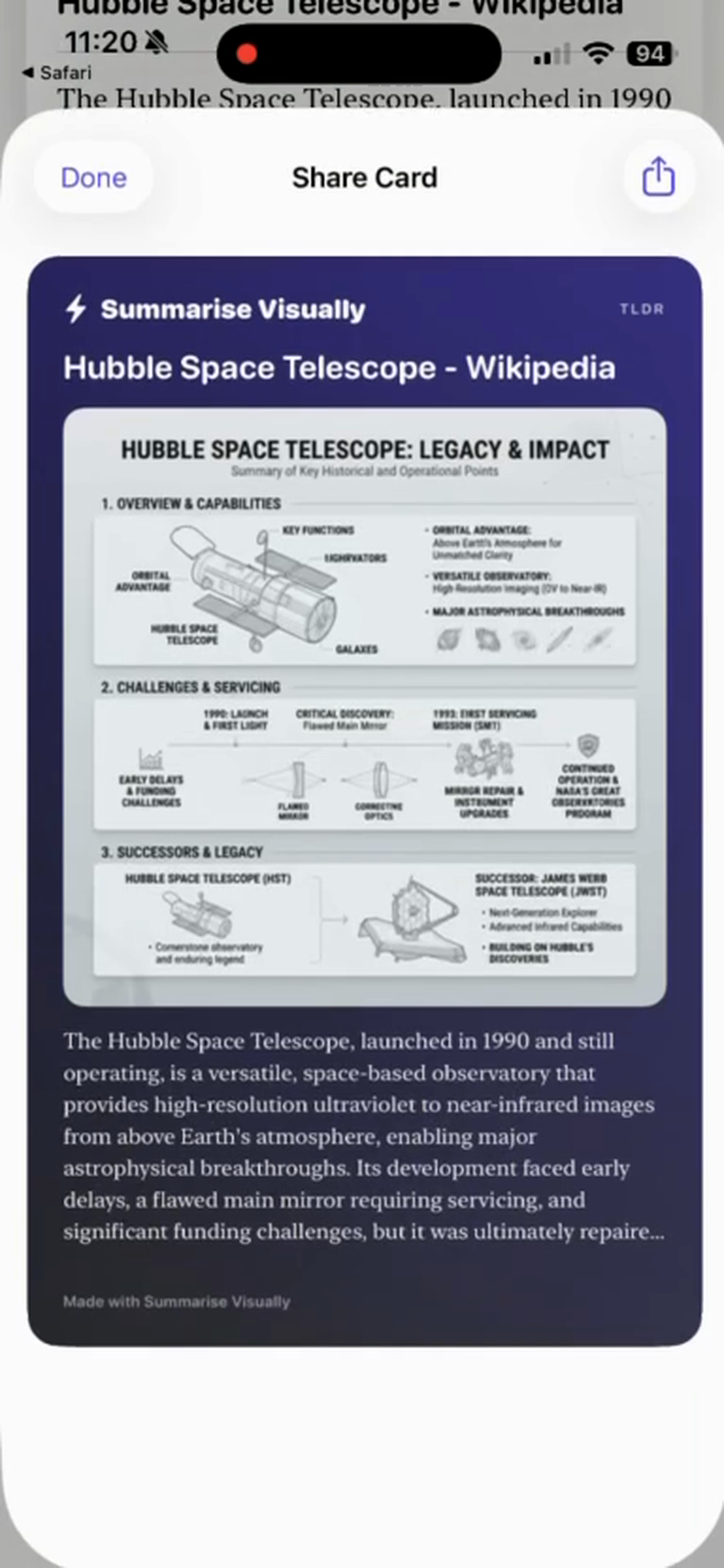
The Hubble share card above is the available current capture. It proves that the interface can present a generated visual and summary together; it is not an assessment of scientific completeness or image accuracy.
What works well
- Begin with a text summary whose important claims you have already checked.
- Treat the visual as an interpretation that can be compared with the text line by line.
- Use the card when the combination of image and short explanation communicates the intended takeaway.
- Keep source attribution and necessary context outside the card when the compact format cannot contain them safely.
Limitations
Generated imagery can invent labels, objects, relationships, chronology, or emphasis. It can make a conditional statement look absolute and can give an abstract idea an unjustified physical form. The share card also shortens the available context, so a visually convincing output may still be misleading.
Premium is required for the reviewed Visualize action. This page does not hard-code a price, trial, generation quota, or permanent entitlement because those terms can change and were not needed to explain the workflow.
Visual summary questions
What is a visual summary in this app?
It is a generated visual explanation derived from a completed text summary, which can be presented with that text in a share card.
Is the visual extracted directly from the original source?
No. It is generated from the summary, so it sits one interpretation further away from the source.
Does Visualize require Premium?
Yes in the reviewed build. Check the current in-app presentation for the latest availability and terms.
Can I treat the image as factual evidence?
No. Verify factual meaning in the original source and use the visual only when it faithfully supports your intended explanation.
Related ways to learn
- Choose an input and text format in the AI summarizer workflow.
- Prepare a checked result with the article workflow.
- Apply stricter verification to research paper notes.
- If Premium visual output fits your task, continue to the download handoff.